

We are delighted to announce a new enhancement to our Newsletter module—one of the most requested features from our users.
This update is designed to give you even more efficient control over your recipient lists, while providing greater visibility into the quality and health of your contact databases.
From the Recipients tab, you can now access a dedicated recipient management interface by clicking on a list.
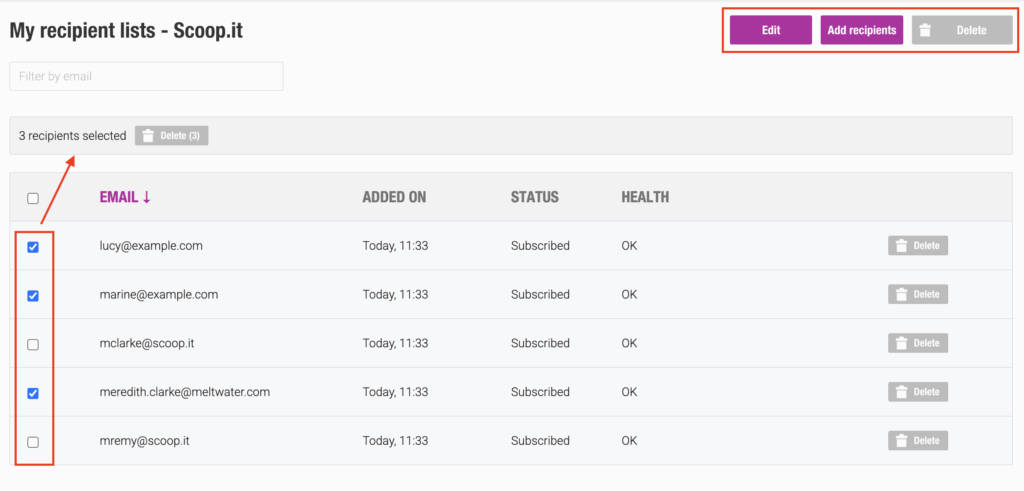
The following actions are available:
- Edit – Modify the list name, existing contacts, and subscription preferences (including allowing unsubscribes).
- Add Recipients – Add new recipients without affecting the existing contact list.
- Delete – Permanently delete the list.
- Bulk Actions – Select multiple recipients and perform bulk operations such as delete, re-subscribe, or reactivate.
After sending a newsletter using the Create Campaign option, the recipient list displayed on the left side of the statistics dashboard (“Number of Recipients”) now includes several delivery statuses that help you monitor distribution progress:
- Pending
- Sending
- Sent
- Delayed
- Bounced
- Expired
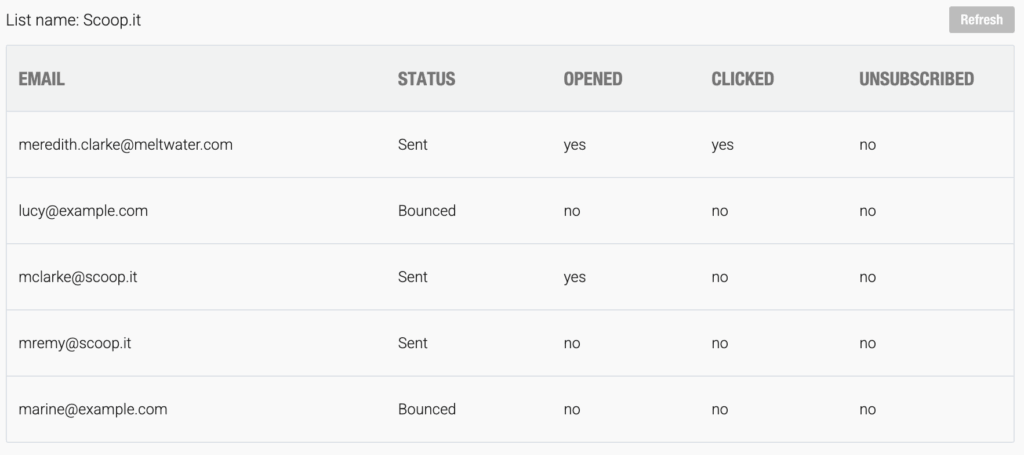
Status Definitions
Bounced
The email could not be delivered to the recipient. A bounce may be either temporary (soft bounce) or permanent (hard bounce).
Delayed
A waiting period during which the system continues attempting delivery before determining whether the failure should be classified as a soft bounce.
To help you better understand the overall health of your recipient lists from the Recipients tab, three list statuses are now available:
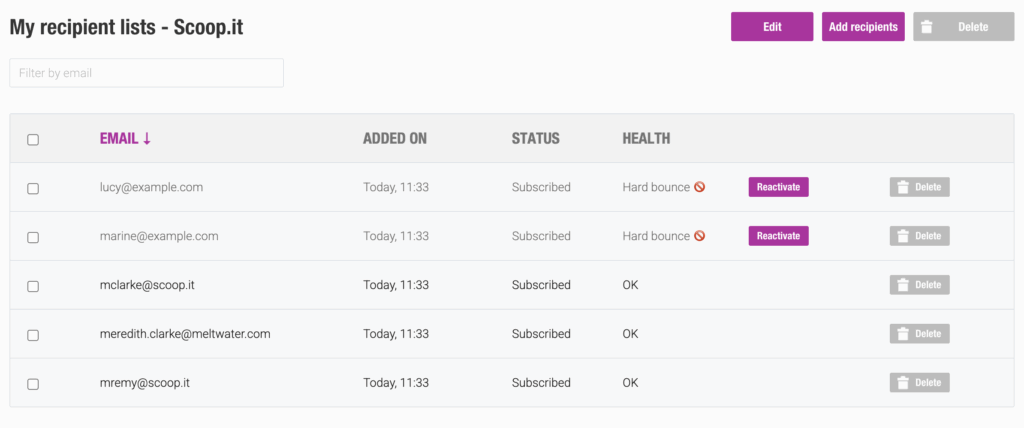
- OK
- Hard Bounce
- Soft Bounce
The last two statuses are displayed only after three consecutive failed delivery attempts.
This rule helps prevent valid email addresses from being removed prematurely, as some email servers may temporarily reject a newsletter or classify it as spam during one or two delivery attempts before accepting it on a subsequent send.
When a hard or soft bounce status is confirmed, the email address is automatically removed from the recipient list.
Of course, it remains possible to reactivate a previously disabled email address at any time.
Understanding Bounce Types
Hard Bounce
A permanent delivery failure. The recipient’s email address is invalid or no longer exists.
Soft Bounce
A temporary delivery failure. The email address is valid, but the message could not be delivered due to a temporary issue.
Common causes include:
- Full mailbox
- Recipient server unavailable or overloaded
- Message size too large
- Temporary connection issue
Thanks to these new indicators, you will be able to make more informed decisions regarding your mailing lists and maximize the impact of your newsletters.
Please note that these new data points are available for campaigns sent from June 4, 2026, onward.

 (2 votes, average: 5.00 out of 5)
 Loading...